S-Ray™Diagnostic Intelligence
The proprietary diagnostic system that gets smarter about your machine with every visit.
In client service since
Designed & built in house bySteve Schardein
AvailabilityExclusively at Triple-S
Not a concept. Part of the work.
S-Ray is a diagnostic intelligence platform I invented, designed, and built from scratch. It runs on every machine that comes through my lab, connecting evidence across hardware, software, security, and service history to uncover problems that can escape even the most careful manual inspection. Following all those connections by hand takes time—and knowing which ones deserve attention takes experience. I built S-Ray to make that depth of investigation a consistent part of every service, with my own judgment guiding the work.
S-Ray has been in everyday client service at Triple-S since February 2026, after an extended period of private development and testing (over a thousand hours). This is a working system I use in real diagnosis and repair, and I continue to expand and refine it through that work. By my judgment, it renders my work anywhere from 30 to 70 percent more efficient on average (and minimizes mistakes and oversights).
For twenty years, my reputation has been built on unusually thorough diagnosis, repair, and documentation. S-Ray did not create those standards. I built S-Ray because of them.
This isn't someone else's diagnostic product with my logo attached. The software and the working system are my own. AI is one component—not the whole product, and certainly not the person doing your repair.
More than a scan. A better way to work the case.
Most diagnostic tools check one thing at a time. They'll tell you your drive is healthy, your memory passes, your CPU runs cool. They check their box and move on. The problem is that the most damaging issues in the real world don't live inside a single box. They live in the connections between them.
That's the kind of problem S-Ray was built to find.
S-Ray brings evidence from hardware, storage, software, drivers, crashes, security, browsers, and other areas of Windows into the same investigation. It relates that evidence to the machine's service history, prioritizes what deserves attention, and gives me a practical way to work through it. Every finding is backed by specific evidence from your machine's own data. Nothing generic. No laundry list of alarming labels.
My own collection software gathers detailed diagnostic evidence from across the computer, the same way every time—instead of relying on a single scanner's verdict.
S-Ray connects related observations, folds in your machine's service history, and returns prioritized findings with the evidence behind each one.
Findings, investigation links, and technician-approved repair steps sit together in one working interface. I review the conclusions and approve the work before anything runs.
A follow-up comparison checks the machine's actual condition against the original findings: resolved, improved, or still present. That outcome becomes part of your machine's history for next time.
The benefit is practical: less time reconstructing what happened, fewer unproductive detours, and more attention on the problems that matter. It adds breadth and continuity to the hands-on testing and repair I already perform.
A command reporting “success” and a problem being resolved are not the same thing. True diagnostic thoroughness means checking beyond the checkmark.
S-Ray in action—not a mockup.
This is an excerpt from a real service case. Notice the distinction it makes: a malicious download had been quarantined, but separate browser changes still required attention. The useful answer was not simply “Defender blocked something.” It was understanding what that did—and did not—resolve.
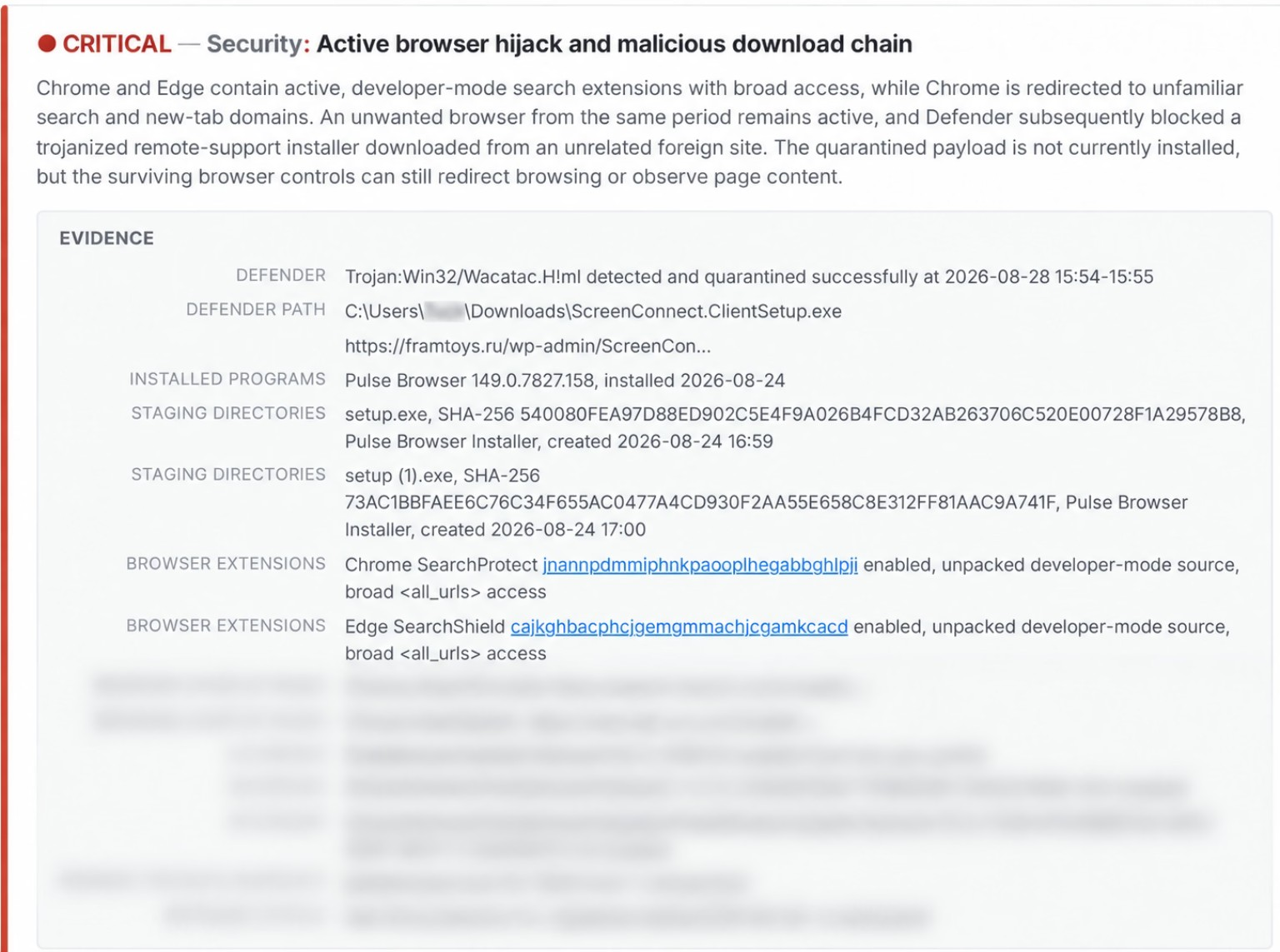
S-Ray in action: a real finding from a service case. S-Ray correlated Microsoft Defender history, downloaded-file provenance, installed software, staging artifacts, browser settings, and two separate extension inventories to identify an active browser-hijack chain—and distinguished the already-quarantined download from the browser controls that were still live. Completing S-Ray's recommended steps led to a full remediation and a happy client. Identifying details and additional case information are obscured.
View the full-size excerpt (opens a new tab) →An alarming label is the easy part. Showing exactly what supports it—and what it doesn't establish—is what lets me act on it with confidence.
The Service History Advantage
Here's where things get interesting—and where years of doing the work become something you can't simply download.
If your machine has been serviced by Triple-S before, S-Ray brings that service history into the analysis—even if the work predated S-Ray. Not just a note that you were here last year—but what was found, what was fixed, what was recommended, and how the machine was behaving at the time.
That gives today's findings context. Is this a new problem, or a recurring one? Has the hardware changed? Is an “acceptable” measurement actually a decline from the machine's earlier condition? Did the previous repair address the cause, or just make the symptom disappear for a while?
Think of it like the difference between a single doctor's visit and a relationship with a physician who has your complete medical history going back fifteen years. The snapshot has value. The longitudinal picture tells you considerably more.
What S-Ray is built on
Taking Lessons from History
But S-Ray doesn't just benefit from your machine's history. It draws on lessons from the thousands of other machines I've repaired. When a familiar problem turns up again, that experience is part of the investigation—not buried in a report from six years ago that nobody remembers to look for.
It might also notice that an error keeps appearing alongside a particular combination of conditions that would otherwise not have been obvious to expert-level human techs (even *rubs nails on shirt* world-class pros like yours truly).
That is where the ongoing development really pays off. I check those lessons against what actually happened on real machines and use them to refine S-Ray's future analyses. “Smarter with every visit” means deeper history, better-informed diagnosis, and lessons tested against the work—not just a growing pile of data. It suggests refinements to itself, and I regularly review and implement the changes.
Yes—it actually works. It's being used right now, every day, by me.
Documented field example
The Drive That Wasn't There
A client brought in their laptop for a routine tune-up. They mentioned a printer issue. The machine was otherwise “fine.”
S-Ray found something the client didn't know about: a pattern of escalating failures involving their external backup drive, based on evidence the laptop had recorded before the visit.
The drive was never connected during my entire service window. It was at the client's home. But the traces it left behind in the system told a clear story, and S-Ray knew how to read them.
A faster laptop and a fixed printer would have addressed the reported problems. Neither would have told the client that the device they relied on as their safety net was quietly failing. S-Ray brought that into the conversation before the backup was needed.
Sometimes the most important problem is the one nobody thought to mention.
That's the difference between checking boxes and understanding what the machine is actually telling you.
Easy to describe. Much harder to reproduce.
There's a misconception that you can build a system like this by pointing a frontier AI model at raw system data and letting it figure things out. I tried that early on. The result was clinically ambiguous (and still is).
The difficult part is not getting an AI to say something about a computer. It is getting useful findings instead of noise, relevant evidence instead of generic advice, and practical next steps instead of another afternoon spent chasing phantom problems.
The thing that makes S-Ray work isn't just the analysis engine. It's the institutional knowledge that governs the analysis engine.
Buying access to an AI model does not buy 20+ years of repair experience. Nor does it recreate the records of the work, or the system I built to put them to use. That foundation was built long ago, one service at a time—not downloaded with a software license.
I have not encountered another independent repair service offering this combination at this depth. S-Ray is my own proprietary platform, and today it's only available here.
I am happy to show you what it finds. I am not publishing the recipe.
The Baseline Advantage for New Clients
For a new client, the first analysis establishes a starting point. After setup or repair, a follow-up documents the resulting condition. Later visits then have something concrete to compare against—rather than somebody's recollection that the computer “used to be faster.”
A freshly configured PC is a particularly good opportunity to capture that healthy baseline. Your first visit benefits from the experience already behind S-Ray. Your next visit adds the advantage of knowing your machine.
What S-Ray Does Not Do
S-Ray is here to diagnose your computer, not read your documents, photos, or email. It examines system health, software, configuration, and operating behavior. Think of it as reading the instrument panel and metrics of your car using an OBD2 scanner, not opening the glovebox.
S-Ray does not hand your PC over to an AI. The AI works from diagnostic information my software gathers. It never has control of your machine. I review the findings, decide what needs attention, and approve the actions taken on your computer. My tools. My judgment. My responsibility.
S-Ray does not leave a monitoring agent running on your computer. I run it from my service toolkit during the visit. A small service-history record stays behind so the next visit has a baseline to compare against; nothing keeps running after I leave.
Exclusive today. Built with room to grow.
Right now, S-Ray is exclusive to Triple-S Computers clients. I built it, I run it, and I am its sole operator.
It has grown into a system substantial enough that I may eventually offer it to selected repair shops and IT departments on a subscription basis. For now, getting the benefit of S-Ray means bringing your computer to the person who built it.
Frequently Asked Questions
How is S-Ray different from running a diagnostic scan?
Traditional diagnostic tools check individual subsystems in isolation. S-Ray looks for connections across those domains and brings your machine's service history into the same investigation. And it doesn't stop at the initial report: the working interface supports investigation, technician-approved repair actions, progress tracking, and follow-up checking. It adds to careful hands-on diagnosis; it doesn't replace it.
Does S-Ray use AI? Is that risky?
Yes, it uses AI—but not by handing over control of your PC. The AI analyzes diagnostic information my own software gathers, connects the dots, and brings items of concern to me. Nothing it suggests runs on your machine without my review and approval. The person responsible for your repair is still me.
Does S-Ray access my personal files?
S-Ray's diagnostic analysis is about the computer: hardware health, software, system behavior, security, and browser configuration—not the contents of your documents, photos, or email.
Does S-Ray install anything on my computer?
No. S-Ray doesn't install a monitoring agent or any background software. I run it from my portable toolkit during the service visit. A small service-history record stays on the machine so the next visit has a baseline to compare against; nothing keeps running after I leave.
Can S-Ray really detect problems with devices that aren't connected?
Yes. A computer can retain useful evidence of problems with devices it has previously used, including external drives. S-Ray can bring that evidence into the investigation even when the device isn't there. The external backup drive case study is a documented example of exactly this capability.
How accurate is S-Ray?
The target is zero false positives, and I'm very close to that goal after thousands of hours of grueling refinement. I want useful, evidence-backed findings—not a longer list of things to worry about. S-Ray is built around that standard, and I review the findings before acting on them. The real test is whether the diagnosis holds up when I investigate and check the result.
Why is service history so important to S-Ray?
Because some of the most informative diagnostic insights come from change over time, not from static snapshots. A measurement that reads “acceptable” today might be perfectly fine—or it might represent significant degradation from where it was six months ago. A recurring browser hijacker might look like a new infection—or it might be the third time the same root cause has resurfaced. History makes those distinctions possible.
Is S-Ray available at other repair shops?
Not currently. S-Ray is exclusive to Triple-S Computers clients. I may eventually offer it to selected repair shops and IT departments, but for now, getting its benefits means bringing your computer to the person who built it.
Why can't someone else just build one of their own?
They can try. The AI analysis engine is one component. The part that took years is everything else: the calibration tuned across 6,000+ machine configurations, the correlation rules validated against real outcomes, the interminable (and continuing) refinements to logic and operation, and—of course—fifteen years of service history that teaches the system what “normal” looks like. Without that foundation, an analysis engine produces noise, not intelligence. You don't get it with an AI subscription.
Is S-Ray how you produce those famous Service Reports?
No; in fact, it's the other way around. S-Ray was made possible by the existence of these Service Reports that take me so long to craft, as well as the technical record that accompanies each and every one of them. Those reports came first—and they're a major reason S-Ray is so far ahead of anything else I've seen in the industry today.
You say that S-Ray refines itself. How does this work?
With me in the loop, always. When S-Ray sees enough evidence that one of its own rules or thresholds should change, it can propose the change—and I approve or dismiss it. I can also request refinements myself from several points in the workflow. Behind that, pattern analysis across cases runs continuously and feeds the same review process. Two boundaries hold throughout: no AI model is ever trained on data collected from any computer, and your machine's records inform your machine's analysis only. What carries over to other cases is the lesson ("this manufacturer's utility throws harmless errors"), never anything identifying you or your computer.
Is S-Ray real software, or an AI with a nice name?
Oh, it's very real. The collection side began years ago as scripts I wrote for my own use; today it is a compiled, digitally signed Windows application I built in C#, backed by server infrastructure I designed with encrypted transport, encrypted storage, and records kept separate for each client. The AI is just one component inside that system, not the system itself. Ultimately, it has grown well beyond what I originally set out to build.
Does S-Ray cost extra?
No. Every machine that comes through my lab receives a full S-Ray analysis as part of the standard service. It's how I work—not an add-on.
Does anyone else anywhere have anything like this?
I'm really not sure; I've been asking myself the same question for a while now. In the residential/small business computer repair space? I'm pretty sure the answer is actually no.
Part of the service. Not an upsell.
Every machine that passes through my lab for general service receives an S-Ray analysis.
It's included with every Triple-S Tune-Up, every new PC setup, and every major service. There's no extra charge and no upsell. It's simply how I work now—because once you have a system that finds things this effectively, it would be irresponsible not to run it.
You are still hiring me to diagnose and repair your computer. You are also getting the benefit of a system I built to make that work more thorough, more efficient, and better informed.
Written by Steve Schardein, owner of Triple-S Computers and creator of S-Ray. Updated .